Semantic HTML explained
What is Semantic HTML?
Semantic HTML, introduced in October 2014 with the release of HTML5, consists of elements that clearly characterise their meaning and role within a webpage. These elements are designed to be easily understood not only by web browsers, but also by developers, search engines, and assistive technologies such as screen readers. Unlike non-semantic elements like <div> and <span>, semantic elements exist with a specific purpose, making your markup more expressive, intentional, and self-explanatory.
In an abstract sense, semantics refers to the meaning behind a piece of code. When complemented with HTML, it means selecting the elements that accurately describe the content they contain. Instead of relying on class names or comments to explain structure, semantic HTML allows the markup itself to tell the story. This results in cleaner code and intent, and a document that is easier to reason about over time.
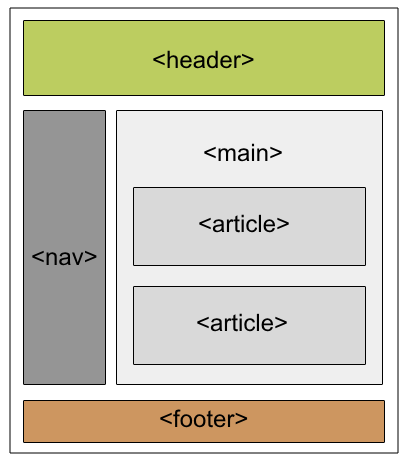
An assortment of examples of semantic elements include heading tags such as <h1> through <h6>, as well as structural elements like <footer>, <main>, <article>, and <mark>. While these are among the most frequently used, HTML5 actually designates around 100 semantic elements in total. When used correctly, these elements significantly improve composition, making projects easier to understand, maintain, and scale as they grow.
Non-semantic vs Semantic HTML
When building a website, it can be confusing to decide which approach to use, especially when both semantic and non-semantic HTML technically “work”. However, the difference lies in clarity, accessibility, and long-term maintainability.
Non-semantic ❌
<div class="header">
    <div class="nav">
        <div class="item">Home</div>
        <div class="item">Blog</div>
    </div>
</div>
In this example, the structure relies heavily on generic containers and class names. While it may render correctly in the browser, the markup provides no inherent meaning, nor are they any links to get you anywhere. This quickly becomes cluttered, difficult to interpret, and harder to maintain as the project grows. Neither browsers nor assistive technologies can easily determine what this section represents.
Semantic ✅
<header>
  <nav>
    <ul>
      <li><a href="/">Home</a></li>
      <li><a href="/blog">Blog</a></li>
    </ul>
  </nav>
</header>
This version is far more descriptive and intentional. Elements such as <header>, <nav>, <ul>, <li>, and <a> clearly communicate structure and purpose. This approach improves accessibility, enhances SEO, and makes the codebase easier to understand at a glance — a major advantage when working on larger or collaborative projects.
Why Semantic HTML Matters
By including semantic HTML in your code, you support a wide range of tools and systems designed to interpret and interact with web content more intelligently.
Accessibility
Semantic HTML is essential for accessibility. Screen readers rely on semantic elements to understand page structure and navigation. When used correctly, semantic markup allows assistive technologies to:
- announce page landmarks
- skip repetitive content
- navigate efficiently
This creates a more inclusive experience for users who rely on accessibility tools.
SEO
Search engines like Google also use semantic HTML to better understand content hierarchy and relevance. Semantic elements help with:
- crafting page hierarchy
- distinguishing article content
- extracting rich snippets of content
For example, wrapping content in an <article> element helps search engines associate keywords, context, and meaning more effectively.
Peace of mind
Semantic HTML isn’t just for machines — it benefits developers too. Clear markup reduces cognitive load and improves collaboration. It helps developers:
- reduce the need for comments and class names
- improves readability between code snippets
- select elements more precisely and easily with CSS and JavaScript
Semantic HTML Cheatsheet
| Tag | Notes |
|---|---|
<header> |
Introductory content or navigation |
<nav> |
Navigation menus |
<main> |
Primary page content or hero sections |
<article> |
Standalone content (blog posts, cards) |
<section> |
Thematic groupings for content |
<aside> |
Secondary or related content |
<footer> |
Page Metadata or footer content |
When NOT to use semantic elements
Semantic HTML is about meaning, not aesthetics. You should avoid:
- using semantic elements purely for styling
- nesting landmark elements incorrectly
- placing multiple
<main>elements on a single page
Misusing semantic elements can negatively impact accessibility and SEO. If an element does not add meaning, a<div>may be the more appropriate choice.
Final thoughts
Overall, semantic HTML is a simple yet powerful way to structure your website more thoughtfully. When used correctly, it improves accessibility, strengthens SEO, and makes your codebase easier to maintain and scale.
Happy coding! 🌶️